What Is Phoenix Contact Used For?
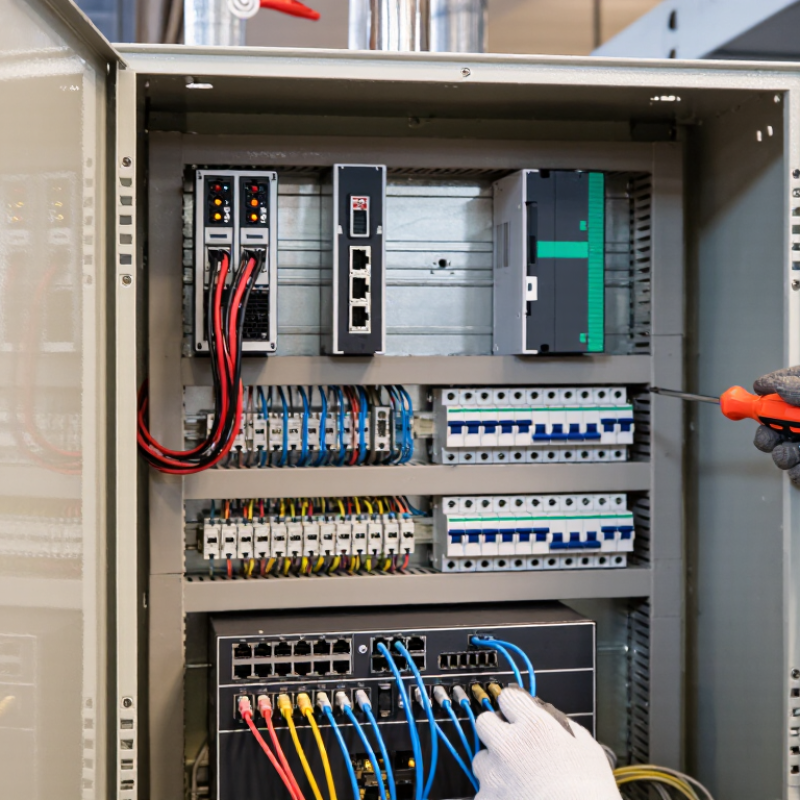
Phoenix Contact is a global supplier of electrical connection, automation, and industrial communication technologies. Its products help equipment exchange signals, receive power, and operate reliably in factories, buildings, and infrastructure. Think of a control cabinet: rows of terminal blocks organize wires, a power supply feeds control devices, and a controller manages machine functions. These components work behind the scenes. Often unnoticed.
The question “What Is Phoenix Contact Used For?” has no single answer, because its products serve many different technical tasks. Engineers and system integrators may use its terminal blocks, connectors, relays, power supplies, PLCs, industrial Ethernet equipment, and surge protection devices. Together, these products can support machine control, process monitoring, energy distribution, and communication between industrial devices. The right choice depends on voltage, environment, required signals, safety needs, and compatibility with the wider system. A product name alone does not prove it suits a particular installation.
This guide explains common applications and clarifies how Phoenix Contact fits into an automation system. It also distinguishes individual components from complete solutions, since marketing language can make that difference easy to miss. For reliable decisions, check current product documentation and consult a qualified engineer when system requirements are unclear. Small details matter. A wiring error or mismatched interface can disrupt otherwise well-designed equipment.
What Is Phoenix Contact?
The name refers to an industrial technology manufacturer focused on electrical connections, automation, and control systems. Its equipment helps machines, sensors, and computers exchange power and information reliably. Products can include terminal blocks, industrial connectors, power supplies, relays, and control devices. These parts often sit inside cabinets on factory floors, where vibration, heat, and electrical noise can affect performance.
In practice, an engineer might use a connector to link a sensor to a controller, or a power supply to keep a control panel operating steadily. The equipment is designed for industrial settings, though the exact product depends on the application. Some systems are simple. Others need careful planning. The category is broad, and that can make the name less clear than it should be. It is not one single device, but a range of technologies used to connect and manage electrical systems. Checking voltage, environmental conditions, and compatibility matters before selecting a component. Small details count.
What Products and Technologies Does Phoenix Contact Provide?
The portfolio spans industrial connectivity, control, power, and charging technologies. Inside a control cabinet, terminal blocks, relays, power supplies, and circuit protection distribute power and connect sensors. Programmable controllers and remote I/O modules read temperatures, motor speeds, and pressure signals, then trigger pumps or conveyors. Small details matter. Surge protection and industrial Ethernet switches can help reduce signal faults caused by electrical noise or long cable runs.
These technologies also serve renewable-energy sites and electric-vehicle charging networks. The IEA’s Renewables 2023 report says global renewable capacity additions reached nearly 510 GW in 2023, about 50% above 2022. That growth increases the need for power conversion, monitoring, and dependable field connections. At charging stations, connectors, controllers, protection devices, and communication interfaces coordinate power delivery. The IEA’s Global EV Outlook 2024 reports nearly 14 million electric-car sales in 2023, around 18% of all car sales.
In practice, engineers choose components around voltage, current, temperature, and installation conditions—not a catalogue headline. A compact enclosure may need carefully matched protection and ventilation. Safety relays and monitoring tools can support machine safeguards, while configurable controllers help adapt production lines. Still, more connectivity is not automatically better. Poor network planning can make faults harder to trace, so clear labeling and tested wiring remain essential.
How Does Phoenix Contact Support Industrial Automation?
Industrial automation turns sensor signals into dependable machine actions. Control components help connect sensors, motors, drives, and operator panels. In a production cabinet, terminal blocks organize field wiring, while power supplies provide stable voltage to controllers and sensors. Programmable controllers process inputs and trigger outputs, such as starting a pump when a tank reaches a set level. Small details matter.
Communication modules let machines exchange operating data with supervisory systems. This can help technicians spot a stalled conveyor or rising temperature before production is disrupted. Protective devices also help guard circuits against overloads and electrical surges. In practice, these parts work best when selected for the environment, load, and required response time—not just because they fit the cabinet.
A well-planned setup can make troubleshooting easier. Clear labels, consistent wiring, and accessible network connections save time when a line stops. That takes testing. Engineers should verify signal behavior, protection settings, and communication links under real operating conditions. Even a tidy design can miss a noisy sensor or an awkward maintenance step. Reviewing those weak points early helps automation remain practical, safe, and easier to maintain.
Which Industries Use Phoenix Contact Solutions?
Industrial connection and control solutions serve factories, energy facilities, transport networks, and commercial buildings. In manufacturing, they link sensors, motors, and programmable controllers on production lines. A technician may use terminal blocks and remote input-output modules to trace a faulty signal without dismantling an entire cabinet. Small details matter. Secure, clearly labeled connections can reduce maintenance delays.
Energy operators use these systems in substations, renewable power sites, and storage facilities to monitor equipment and exchange operating data. Rail and road infrastructure relies on rugged components for signaling, traffic control, and equipment cabinets exposed to vibration or changing temperatures. Building managers apply control devices to lighting, ventilation, and access systems. Water treatment plants also use them to monitor pumps and process conditions. Conditions vary. Dust, moisture, electrical noise, and limited cabinet space can affect component selection. A standard design may not fit every site, and compatibility should be checked against the equipment, environment, and maintenance plan. That extra review can feel tedious, but skipping it creates avoidable troubleshooting later.
How Are Phoenix Contact Products Selected and Integrated?
Selecting industrial connection and automation products begins with the electrical load, not the catalogue. Record operating voltage, current, signal type, and available panel space. Then check wire size, terminal style, and whether components need to work together. A connector that fits physically may still be unsuitable for the circuit.
Environment matters. A cabinet near a washdown area needs different protection from a dry control room. Note temperature, vibration, dust, and moisture before choosing enclosures, terminals, or cable entries. Small details count. A loose fit can cause heat or intermittent signals.
Integration should follow a clear wiring diagram and device layout. Leave room for labels, bend radius, and future maintenance. Match interfaces and communication protocols to the controller and field devices, then verify each connection before energizing the system. Test it. Check continuity, polarity, and signal behavior under normal operating conditions. In practice, drawings sometimes miss crowded cabinets or awkward cable routes; revise the plan when the physical layout demands it. That extra review may feel slow, but it can prevent troubleshooting after startup.